 CameraShyRead story (opens in a new tab)
Aug 21 2026
BlockedIn
BlockedIn lets you permanently remove companies and their job postings from your job feed.
Results
1,000+
Chrome installs, zero paid distribution
Results
250k+
listings removed from feeds
Results
350
daily active users
Overview
Job search is a filtering problem with a first-come, first-served twist. LinkedIn optimizes for surfacing more listings; job seekers need faster ways to remove the ones that don’t belong in their feed.
BlockedIn gives users control over the source of that feed. One click blocks a company, clears its listings from the results, and lets the search continue — no account, no dashboard, no context switch.
Problem
During my master’s job search, LinkedIn became my primary workspace — it replaced almost every other platform I used. I spent hours a day searching for roles, filtering listings, reaching out to recruiters, and trying to find opportunities before they disappeared into thousands of applications.
For many students graduating into the 2025 AI hiring shift, this was the reality. High student debt, an uncertain market, and fewer entry-level openings meant every application mattered. The problem was never a lack of jobs — it was finding the right ones before they were buried.
LinkedIn’s newest listings were often the highest-signal opportunities. A role posted minutes ago meant fewer applicants, a better chance of getting noticed, and more time to reach out through referrals before the pool grew. But that signal was constantly being overwhelmed.
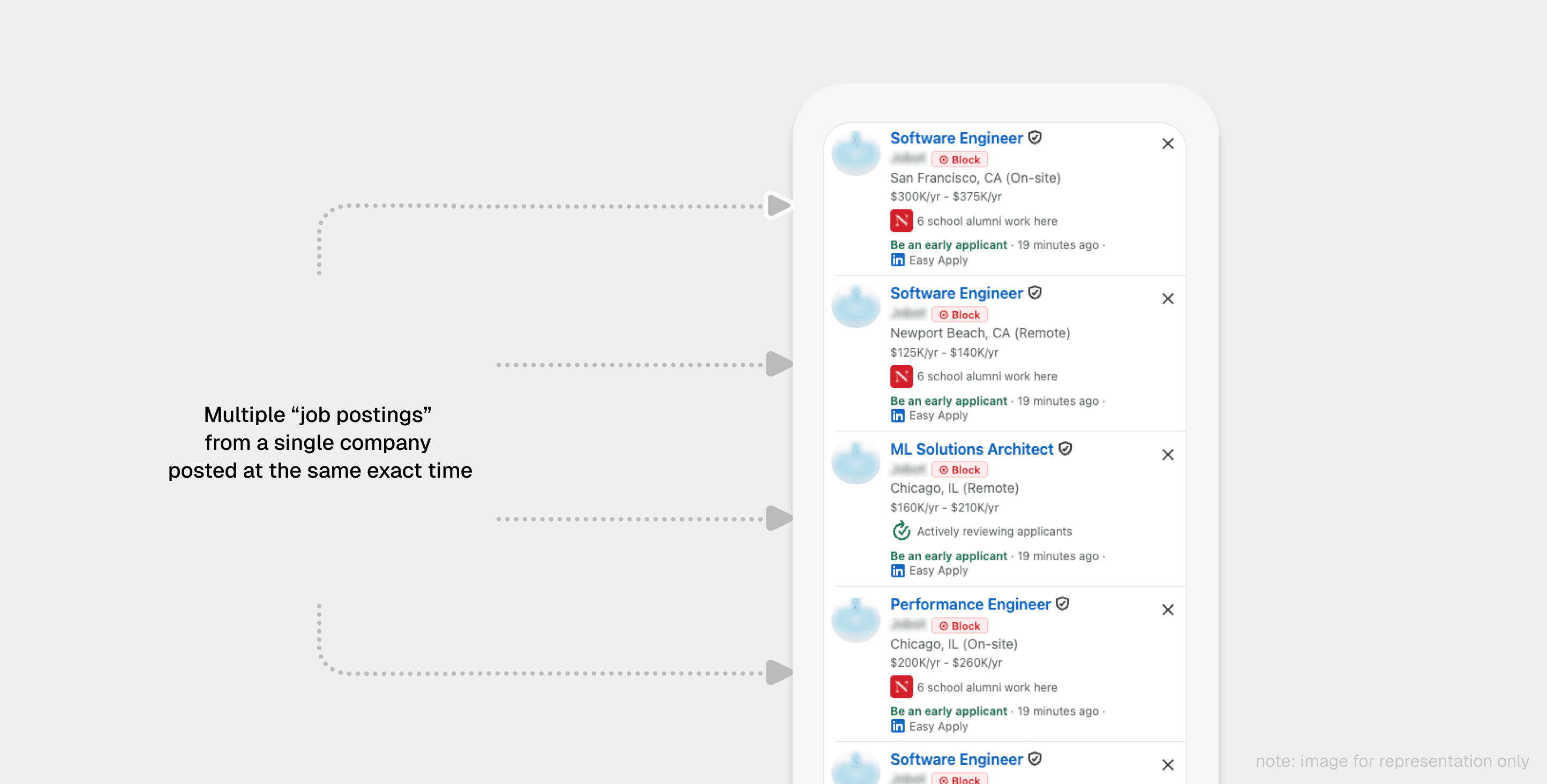
As companies froze hiring, many began reposting existing roles to collect candidate data, maintain visibility, or appear actively hiring. Automated posting systems amplified the problem, pushing the same listings into search results again and again. A refresh that should have surfaced a handful of new roles could instead add dozens of repeats, burying the jobs that actually mattered pages deep.
Why per-listing filtering fell short
LinkedIn’s controls were built around the individual listing. A user could hide a job they didn’t want to see, but the company could return with another role, another search result, or the same posting through a different listing. The reframe underneath the whole product is small but decisive:
The problem was never “I don’t want to see this job.”
It was “I don’t want this company to consume my search results.”
Job seekers needed source-level control over their feed — not another way to hide individual posts.
Understanding the user
I started with my own search behavior, but the pattern extended well beyond me. Job seekers weren’t looking for more listings; they were trying to identify the few opportunities worth their attention before those disappeared into the noise.
Across conversations with early users and usage data after launch, three behaviors stood out — and each one pointed directly at a design decision.
| What job seekers did | What we observed | Design implication |
|---|---|---|
| Decided on companies, not listings | Once trust in a company was gone, another posting from it created friction, not opportunity | A block should be permanent and company-wide |
| Prioritized fresh listings | New roles carry the value; every extra result adds distance to them | Removing noise has to be fast |
| Filtered while scanning, not in settings | Nobody wanted another preferences page to maintain | Control belongs in the discovery flow itself |
The missing primitive wasn’t another search filter. It was permanent, source-level control, available at the exact moment a user hit an unwanted listing.
Design
The core principle was simple: blocking should take one action. The moment a user had to open a menu, confirm a dialog, or leave their search flow, the value would disappear. So the interaction lived directly in the scan path — next to the company name — letting users block a company while reviewing listings without interrupting the search.
Native, not noticeable
BlockedIn had to feel like part of LinkedIn while still being discoverable — two goals that pull in opposite directions. The Block action was placed inside the job-scanning flow, matching LinkedIn’s own interaction patterns while carrying just enough visual presence to be recognized as something new.
That placement created an unexpected growth loop. While building BlockedIn in my university library, I noticed a recurring behavior: students would glance at nearby laptop screens when choosing a seat. Those one-second moments of curiosity became organic discovery. A visible-but-native action on a familiar interface generated repeated exposure without interrupting anyone’s workflow — the interface itself became the marketing surface.
One action, not several steps
I considered blocking through right-click menus and secondary interactions. They technically worked, but each added distance between frustration and resolution. The final interaction removed those steps entirely: one click → company blocked → feed cleaned.
Where a block goes after you make it
One click being enough to block only works if one click is also enough to take it back — otherwise every block carries a small hesitation, and hesitation is the thing the whole design is trying to remove. So the blocklist is a panel, not a settings page: a counter in the corner opens it, every blocked company is one row with an unblock beside it, and “unblock all” keeps an undo for the rest of the session.
It also shows the day’s filtered count. That number is the only proof a user ever gets that the extension is still working — on a good day, BlockedIn’s whole job is to make sure nothing shows up.
Less UI, more clarity
The product’s value happened inside LinkedIn, not inside BlockedIn, so the redesign removed everything that didn’t serve that: no confirmation screens, no heavy dashboard animations.
Job searching is already stressful. Keeping the surface small wasn’t just cleaner — it also kept the extension’s attack surface, and the trust it asked for, as small as possible.
Build
BlockedIn was designed around constraints. There was no account system and no backend — the blocklist stayed local through Chrome Sync, keeping infrastructure minimal while protecting user privacy.
The harder problem was living inside LinkedIn’s changing frontend. As the job experience evolved, listings began loading dynamically after the initial page structure appeared, and simple element targeting quietly started missing content. Reliability had to move from “find the element” to a defensive lifecycle:
| Failure mode | How BlockedIn handled it |
|---|---|
| Listings render after the initial page load | Detect dynamically loaded content instead of assuming a static DOM |
| Script runs before the page is ready | Wait for the correct page state before acting |
| Actions injected at the wrong time | Inject the Block control only once its target exists |
| Breakage goes unnoticed | Monitor failures so they surface before users report them |
How it actually works
A Manifest V3 content script runs at document_idle on every LinkedIn page, with the blocklist in chrome.storage.sync — that’s the whole backend. The interesting part is what it anchors on. Matching job cards by class name is what breaks: LinkedIn renames those. So the scan looks for two things LinkedIn can’t easily drop — a [data-job-id] attribute, and its own Dismiss button, which every hydrated card has and which doubles as the signal that a card is finished rendering.
// Every hydrated job card carries LinkedIn's own dismiss
// button. Anchoring on it outlasts the class names, which
// get renamed between releases.
const DISMISS = 'button[aria-label^="Dismiss"]';

const isHydratedCard = (n) =>
  n.nodeType === 1 &&
  (n.matches?.(DISMISS) || n.querySelector?.(DISMISS));

const observer = new MutationObserver((mutations) => {
  // Any mutation is also a chance to catch a soft nav that
  // the SPA never announced.
  if (location.href !== lastUrl) return onSoftNav("url-tick");

  const hydrated = mutations.some((m) =>
    [...m.addedNodes].some(isHydratedCard),
  );

  // Injection is idempotent — it skips cards that already
  // have a button — so batching 200ms of hydration is free.
  if (hydrated) debounce(processJobListings, 200);
});

observer.observe(document.body, {
  childList: true,
  subtree: true,
});
Soft navigation was the other recurring failure. Content scripts run in an isolated world, so patching history.pushState doesn’t work — the patch never sees LinkedIn’s calls. Five independent detectors run instead, and any one of them winning is enough: the Navigation API, popstate, the URL tick above, a three-second polling floor, and a chrome.webNavigation listener in the service worker that fires from the browser process entirely outside the page.
The last piece is knowing when it breaks. Ten seconds after a navigation, if the page clearly has job cards but the scan found none, the extension reports a scan_failed event with the selector counts that missed. That’s the difference between finding out from telemetry and finding out from a one-star review.
Impact
BlockedIn grew organically — personal networks, steady updates, and community sharing, with zero paid distribution. A few posts carried the story:
The most telling metric wasn’t daily usage. Job search is a burst activity — people don’t need BlockedIn every day, they need it in the windows when their attention matters most. That shaped how I read every number that followed.
Lessons
- Users value saved attention more than added featuresThe strongest version of BlockedIn wasn’t the one with more controls — it was the one that removed friction. The next job is making the time it saves go even further.
- Privacy buys trust; analytics finds the pressure pointsLocal storage and no accounts helped people trust the extension, but the reason they kept it was simpler: it saved time. Lightweight analytics was what told me where that time was actually going.
- Platform products live or die on resilienceA product can fail even when the design is right. When you depend on someone else’s platform, monitoring and recovery become part of the user experience.
- Good design often isn’t visibleThe biggest wins came from removing clicks, screens, and complexity. The final product was smaller because the user’s problem was smaller.
Next steps
BlockedIn started as reactive filtering: remove the companies users already know they don’t want. The next step is predictive filtering — reducing unwanted listings before they ever consume attention.
Results
| Signal | Reading | What it tells us |
|---|---|---|
| 1,000+ installs | Organic, zero paid | Word of mouth + the in-feed surface did the distribution |
| 350 daily active users | Sticky within a burst activity | People return when their search attention peaks |
| 250k+ listings removed | Volume of noise cut | The block is doing real work, not sitting idle |
| ~1m 17s to first block | Fast time-to-value | The one-click bet paid off in the first session |
If you’ve actually read all of this, pls send the 🍉 emoji on X— filter coffee is on me!
Quiet the noise in your LinkedIn feed
Block a company once. Its jobs stay gone — no account, no dashboard, no context switch.
Add to Chrome (opens in a new tab)Keep reading
- CameraShyRead story (opens in a new tab)
 AreYouAIRead story (opens in a new tab)
YapflowYapflowRead story (opens in a new tab)